The short answer. Today (November 2026) you can apply for YouTube ad revenue with 1,000 subscribers plus either 4,000 qualified watch hours in 12 months or 10 million qualified Shorts views in 90 days. From 1 February 2027 new applicants need 1,000 subscribers plus either 8,000 qualified watch hours or 20 million qualified Shorts views. Creators already in the Partner Program are not affected by the entry change.
This page gives you two working tools: an eligibility checker for the old and new rules, and an earnings calculator that uses your RPM. It also explains the 2026 and 2027 rules, how to apply online, and what a YouTube monetization agency in India can and cannot do.
YouTube monetization eligibility checker
Enter the numbers from YouTube Studio (Analytics, then Advanced mode) and the checker compares them with every threshold YouTube has published. Nothing you type leaves your browser.
Check my channel against the YPP thresholds
Use only qualified numbers: public long-form watch hours and engaged public Shorts views.
This is a self-check from the numbers you enter. YouTube decides eligibility, and the Earn tab in YouTube Studio is the only place that shows your real status. Thresholds are as published by YouTube on 10 August 2026.
YouTube monetization rules 2026 and 2027
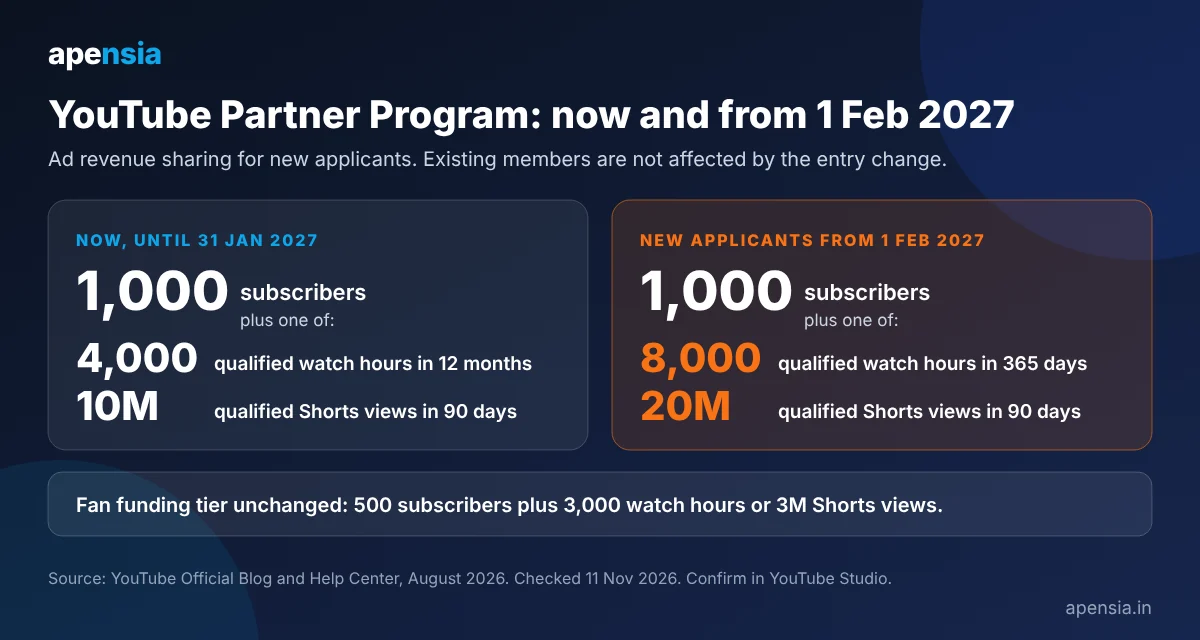
YouTube announced changes to the Partner Program on 10 August 2026. The dates below come from YouTube's own announcement and Help Center pages, listed in the sources at the end.
| When | What applies |
|---|---|
| Now, until 31 January 2027 | Ad revenue sharing: 1,000 subscribers plus 4,000 qualified watch hours in 12 months, or 1,000 subscribers plus 10 million qualified Shorts views in 90 days. |
| Now and unchanged | Fan funding (Super Chat, channel memberships), YouTube Creator Partnerships and YouTube Shopping: 500 subscribers plus 3,000 qualified watch hours in 12 months or 3 million qualified Shorts views in 90 days. |
| By 31 January 2027 | Review and accept the updated terms in YouTube Studio. YouTube says that if you do not, you stop earning from the related monetization features from 1 February 2027. It also says you are not removed from the Partner Program for this. |
| From 1 February 2027 | New applicants need 1,000 subscribers plus 8,000 qualified watch hours in 365 days, or 20 million qualified Shorts views in 90 days. Creators already in the program are not affected by this entry change. |
| From 1 February 2027 | Shorts: to earn from ads and subscription revenue sharing on Shorts, a channel needs 10 million qualified Shorts views in the last 90 days. Below that, the channel stays in the program and keeps earning on long-form videos. |
| From 1 February 2027 | Activity rule: a channel counts as active with any one of 1,000 qualified watch hours in 365 days, 1 million qualified Shorts views in 90 days, or 2 long-form videos or 5 Shorts uploaded every 90 days. A channel that falls below gets an extended 90-day window to recover. |
What counts as "qualified"
Qualified watch hours come from public long-form videos, including podcasts, and from archived live streams. Private, unlisted and deleted videos, views that were watched as an ad, Shorts watch hours and live streams that were not archived do not count. Qualified Shorts views come from public Shorts and must be engaged views, which do not include loops. Always read the numbers in YouTube Studio rather than a third-party tool, because Studio applies YouTube's own counting.
Rules change often, so treat this page as a dated summary (11 November 2026) and confirm in the Earn tab before you plan around a threshold.
YouTube earnings calculator
A calculator cannot know your income from a channel name. YouTube does not publish any channel's revenue, and tools that "check" a channel's income only estimate it from public view counts. The number that matters is your own RPM, which Studio shows under Analytics, then Revenue. Enter it below, or use the example values to see how the maths works.
Estimate monthly YouTube income
All amounts in Indian rupees. RPM means the revenue you earn per 1,000 views after YouTube's share.
The example values (100,000 long-form views at ₹50 RPM and 500,000 Shorts views at ₹5 RPM) are only there to show the arithmetic. They are not typical earnings, and they are not a promise or a forecast.
How many views for a monthly income goal?
Divide the goal by your RPM and multiply by 1,000.
Income per 1,000 views and how RPM works
People search for "YouTube income per 1,000 views" because they want one number, and there is no single number. Three terms get mixed up:
| Term | What it means |
|---|---|
| CPM | What advertisers pay per 1,000 ad impressions, before YouTube's share. |
| Playback-based CPM | The same idea measured per 1,000 monetized playbacks. |
| RPM | What you actually earn per 1,000 views, after YouTube's share, counting views that showed no ad too. This is the figure for planning income. |
Your RPM moves with your niche, the country your viewers are in, video length, the season and the share of views that carried ads. For long-form ads YouTube's standard creator share is 55%. Two channels with the same views can earn very different amounts, so use your own history. Studio's Revenue tab shows both RPM and playback-based CPM for any date range.
If you want the arithmetic without a tool: income = views ÷ 1,000 × RPM. At an RPM of ₹40, 10,000 views earn ₹400 and 1,00,000 views earn ₹4,000. Change the RPM and every line changes in proportion.
About "YouTube earnings calculator by channel name" and Social Blade-style checks: third-party sites show an estimated range built from public view counts. They cannot see ad revenue, memberships, Super Chat or sponsorships, so treat them as a rough guide only. The Revenue tab in your own Studio is the real figure, and a channel you do not own cannot be checked for real income.
How to apply for YouTube monetization online
- Open YouTube Studio for your channel (studio.youtube.com on the web, or the YouTube Studio app) and sign in with the Google account that owns the channel.
- Choose the Earn tab. It shows your progress against each threshold.
- When you meet a tier, choose to apply, then accept the Partner Program terms.
- Connect an AdSense account, or create one, so YouTube knows where to send payments.
- Wait for YouTube's review. The channel is checked against the monetization policies, including originality and reused-content rules, so a channel built mostly from other people's clips can be refused.
- If you are already in the program, remember the extra step: accept the updated terms in Studio by 31 January 2027.
Applying costs nothing, and nobody can buy approval for you. Anyone who sells a "monetized channel" or a guaranteed approval puts your channel and your AdSense account at risk.
YouTube monetization in India
The rules are the same worldwide, so an Indian channel qualifies on the same thresholds. What differs is the money side. Payments come through AdSense, and YouTube asks for tax information as part of the AdSense set-up. How much tax applies to your earnings depends on your own situation, so confirm it with a chartered accountant instead of relying on a blog post. Your audience's country also changes your RPM, because advertisers pay different amounts in different markets.
If you want to reach the thresholds, the work is the same wherever you live: videos people search for, titles and thumbnails that earn the click, and retention that keeps viewers watching. Our YouTube SEO services list and the free or paid monetization guide cover that in detail.
YouTube SEO checker: what to check in YouTube Studio
There is no single score that tells you a video is optimised. A useful YouTube SEO check is a short list you run on every upload, using free data in Studio:
- Search phrase. Does the title lead with a phrase viewers really type? Check the Research tab and the search suggestions.
- Click-through rate. In Analytics, open the Reach tab and compare impressions and CTR across your recent videos.
- Retention. In the Engagement tab, find where viewers drop off and fix the first 30 seconds first.
- Description. The first two lines should say what the video covers in plain words, with the phrase once, naturally.
- Thumbnail. One idea, readable at phone size, and different from the one on the video next to it.
- Playlists and end screens. Does each video lead to a next one on the same topic?
- Traffic sources. In Reach, see how much comes from YouTube search, suggested videos and outside sources, and write more of what search already rewards.
Browser extensions and tools can add keyword ideas and score estimates, but their scores are the tool maker's own, not YouTube's. There is also no official extension that tells you whether a channel is monetized. The Earn tab in Studio is the only authoritative check.
YouTube monetization agency in India: free or paid
People often search for "YouTube monetization SEO free". Some of it is free: YouTube Studio, search suggestions, Google Trends, YouTube's own creator education, and the two tools on this page. What is not free is expert time: a channel audit, rewriting titles, descriptions and thumbnails across many videos, a retention plan and monthly reporting. That work takes hours, which is why a done-for-you service is paid, and anyone offering it free is selling something else.
Apensia Media runs YouTube SEO and monetization support from Chandigarh for creators and brands across India. Our published prices are ₹999 for the YouTube Growth Guide, from ₹2,999 for creator packages and ₹25,000 + GST for the complete YouTube SEO and monetization service. We do not use bots, fake subscribers or paid engagement, we ask for a Manager role instead of your password, and we do not promise approval, views or income, because YouTube makes that decision.
The full list of what is included is on our YouTube SEO and monetization services page.
People also ask
What are the YouTube monetization requirements in 2026?
Until 31 January 2027, ad revenue sharing needs 1,000 subscribers plus either 4,000 qualified watch hours in 12 months or 10 million qualified Shorts views in 90 days. Fan funding such as Super Chat and memberships starts earlier, at 500 subscribers plus 3,000 qualified watch hours or 3 million qualified Shorts views.
What are the YouTube monetization requirements from 1 February 2027?
New applicants need 1,000 subscribers plus either 8,000 qualified watch hours in 365 days or 20 million qualified Shorts views in 90 days. YouTube says creators already in the Partner Program are not affected by this entry change. The 500-subscriber fan funding tier stays the same.
What are the YouTube monetization requirements for views?
There is no overall view count for long-form videos. YouTube counts qualified watch hours instead. For Shorts the count is qualified Shorts views: 10 million in 90 days now, and 20 million in 90 days for new applicants from 1 February 2027.
What are the YouTube monetization requirements for long videos?
Long videos feed the watch-hour count. Only public long-form videos, including podcasts, and archived live streams count. Private, unlisted and deleted videos, ad views and Shorts watch hours do not. Today the target is 4,000 qualified hours in 12 months, and 8,000 in 365 days for new applicants from 1 February 2027.
How do I apply for YouTube monetization online?
Open YouTube Studio, go to the Earn tab, apply when you meet a tier, accept the Partner Program terms, connect AdSense and wait for review. Applying is free.
How much does YouTube pay per 1,000 views?
It depends on your RPM, which varies by niche, audience country, video length, season and the share of views with ads. Your own RPM is in the Revenue tab of YouTube Studio Analytics. Income equals views divided by 1,000, multiplied by your RPM, and the calculator above does that sum for you.
Is there a YouTube earnings calculator that works by channel name?
Third-party sites estimate a range from public view counts, but they cannot see real revenue, and YouTube does not publish any channel's income. The accurate figure for your own channel is in YouTube Studio under Analytics, then Revenue.
Is there a YouTube monetization check extension?
There is no official extension that confirms monetization. Some browser tools show estimates and keyword ideas, but they are not YouTube data. The Earn tab in YouTube Studio shows your real status.
Where do I log in to check YouTube monetization?
Sign in to YouTube Studio with the Google account that owns the channel and open the Earn tab. There is nothing to download, because YouTube Studio runs in the browser and also has a mobile app.
Is YouTube monetization SEO free in India?
The tools are free and applying to the Partner Program is free, but a done-for-you YouTube SEO and monetization service is paid. Apensia publishes its prices: ₹999, from ₹2,999 and ₹25,000 + GST, and we do not guarantee approval or income.
What is the new YouTube Shorts rule for 2027?
From 1 February 2027, a channel needs 10 million qualified Shorts views in 90 days to earn from ads and subscription revenue sharing on Shorts. Channels below that stay in the Partner Program and keep earning on long-form videos.
Sources and notes
Checked on 11 November 2026 against YouTube's own pages. Thresholds can change, so confirm them in YouTube Studio before you act.
- YouTube Official Blog: Partner Program updates for 2027 (10 August 2026)
- YouTube Help: Changes to the YouTube Partner Program
- YouTube Help: YouTube Partner Program overview and eligibility
- YouTube Official Blog: what counts as qualified watch hours and Shorts views
What clients say, good and critical
Collected through our own review page and published after a spam check, not chosen by rating.