Can I pay by UPI for a website?
Yes. Open your invoice, scan the UPI QR code or tap Open UPI app, pay the exact amount, then enter the UTR number.
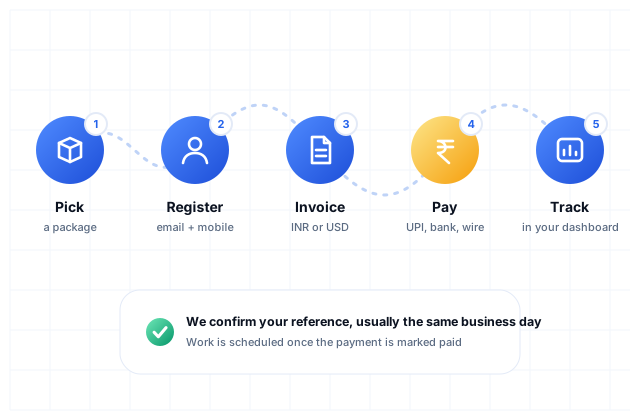
Asked by voice: “Can I pay by UPI for a website”Create a free account, choose a package and open your invoice. In India pay by UPI QR code or NEFT, IMPS or RTGS; from abroad send a SWIFT wire in US dollars. Then enter the UTR or wire reference on the invoice page. We confirm the payment in your dashboard and start the work.
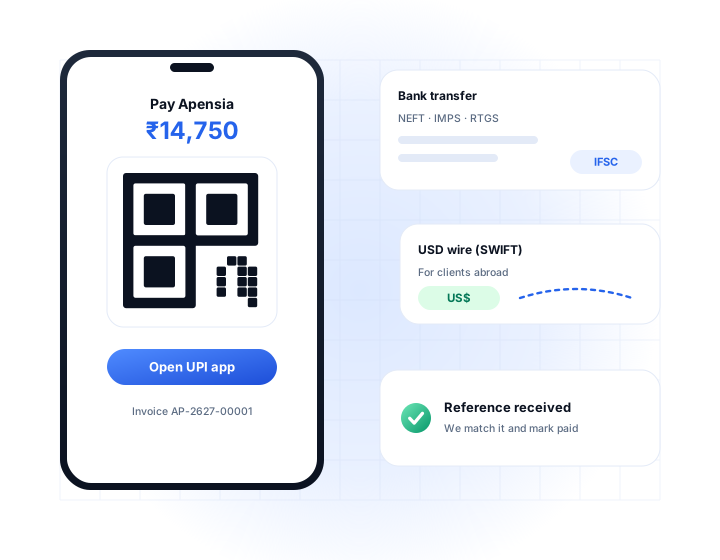
Switch between the tabs to see what each one involves.
The fastest way to pay inside India. Your invoice page shows a QR code and an “Open UPI app” button with the amount and invoice number already filled in.
Use this for larger amounts or when you prefer net banking. The account details are on your invoice page, and the invoice number goes in the payment remarks.
For clients outside India. The invoice is issued in dollars and the amount is fixed when it is created. Indian GST is not charged on exports of services where the conditions are met.
We never ask for card numbers, PINs or OTPs. We only see the transaction reference you type in. If anyone asks for an OTP or PIN in our name, do not share it.
Payments are marked paid by a person after checking our bank, not by a script. You get an email and the invoice changes in your dashboard.
Every invoice states the amount, due date and number, with the GST breakdown for Indian clients. Read the refund policy and terms before you pay.
Yes. Open your invoice, scan the UPI QR code or tap Open UPI app, pay the exact amount, then enter the UTR number.
Asked by voice: “Can I pay by UPI for a website”Yes. Choose USD for your package. The invoice page shows our SWIFT wire details. Please send with all charges borne by you.
Asked by voice: “Can I pay a web agency in US dollars by bank transfer”UPI, NEFT, IMPS and RTGS for payments in Indian rupees, and SWIFT bank wire for payments in US dollars. Cards and payment gateways are not used at present.
UPI and IMPS payments arrive immediately and are usually confirmed the same business day during working hours (Monday to Saturday, 10am to 7pm IST). NEFT and RTGS depend on your bank. International wires can take a few working days to arrive.
The UTR (unique transaction reference) is the reference your bank or UPI app gives you after you pay. In UPI apps it appears under transaction details as UPI Ref No or UTR, normally 12 digits. For a wire, use the reference or SWIFT confirmation your bank provides.
Enter the UTR or wire reference in the invoice page. If you already did, message us from your dashboard or WhatsApp +91 81468 55589 with the reference. Payments are marked paid by a person after checking our bank, not automatically.
Packages with an advance have two invoices: the advance first and the balance later. You can also ask us for a different split in writing before paying.
We never ask for card numbers, PINs or OTPs. You pay from your own bank or UPI app, and we only see the transaction reference you enter. If anyone asks you for an OTP or PIN in our name, do not share it.
Indian clients receive a tax invoice showing GST at 18%, split into CGST and UTGST for Chandigarh clients or IGST elsewhere, once GST details are entered on your account. Export invoices in USD carry no Indian GST where the conditions are met.
Create a free client account, pick a package and pay your first invoice. Or ask us a question first.

Hello! What would you like to talk about? Pick a topic and WhatsApp opens with your message ready to send.
Monday to Saturday, 10am to 7pm IST. Prefer a call? +91 81468 55589