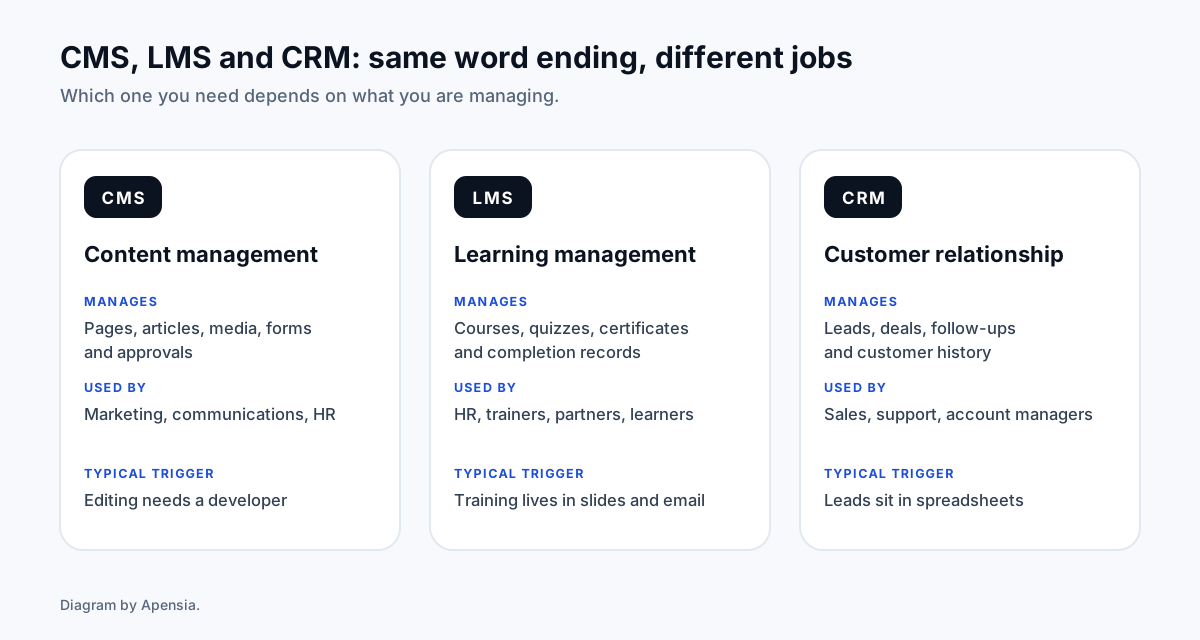
A CMS manages content, an LMS manages training and a CRM manages customers and sales. Buy or configure an existing product when your needs are standard. Build custom when your process is what sets you apart, when you must connect several internal systems, or when you need control over data and access. Either way, deliver in stages, so a small group uses a first version within weeks.
What is the difference between a CMS, an LMS and a CRM?
They share an ending and little else. Each manages a different thing, for a different team.
- CMS (content management system). Holds pages, articles, media and forms, with roles and approvals so marketing and communications teams can publish without a developer.
- LMS (learning management system). Holds courses, lessons, assessments and certificates, and records who has completed what. HR, trainers, partners and learners use it.
- CRM (customer relationship management). Holds leads, deals, follow-ups and customer history, so sales and support see the same picture.
Should we build, buy or configure?
There are three honest options, and the right one is often the least exciting.
Buy or subscribe
Choose an existing product, such as WordPress for content, Moodle for learning or a hosted CRM, when your process is standard and speed matters. You pay for licences or hosting, and you adapt your process to the tool.
Configure and extend
Start with an existing product and build the missing 20 percent: a plugin, an integration, a custom report or a branded front end. This is often the best value for a corporate that is mostly standard.
Build custom
Build when the process is your competitive edge, when you must connect several internal systems, when access rules are unusual, or when licence costs per user would become larger than the cost of owning the software. You carry more responsibility, and you get exactly the fit you need.
We will tell you which option we think fits, including when it is not custom. Our software development work is scoped before it is quoted.
What do corporates usually need that small teams do not?
- Roles and permissions. Who can see, edit, approve and export what.
- Single sign-on. Staff sign in with the accounts they already have, and leavers lose access automatically.
- An audit trail. A record of who changed what and when.
- Integrations. Connections to HR, accounts, email and existing databases. See our API integration guide.
- Reporting. Numbers by team, region and period that leaders trust.
- Data location and retention. Where data is stored, how long it is kept and how it is exported. Where your policy requires, we host on infrastructure you control.
What should go in a brief so the quote is accurate?
- The problem in one paragraph. What goes wrong today, and what it costs in time or money.
- Users. Who will use it, how many, in which roles, and how often.
- The core workflow. The three to five things the system must do on day one.
- Systems to connect. What it must read from or write to.
- Existing data. What must be migrated, in what format, and who owns its quality.
- Rules. Security, access, data location, languages and accessibility requirements.
- Success. How you will know it worked: for example, leads followed up within a day, or training completed by a date.
If you cannot answer all of these, that is normal. A short discovery session fills the gaps, and we write the result down.
How does a staged delivery work?
- Discovery. We learn the process, list the requirements and agree what is in the first release.
- Prototype. Clickable screens for your team to react to before any code is written.
- Pilot. A small group uses a working first version with real data.
- Rollout. The wider team joins, with training and support.
- Handover. You receive the source code, documentation and access to accounts, and we agree what ongoing support looks like.
Each stage is scoped and approved before the next begins, so you can change course without losing the work so far.
What does it cost?
Corporate software is not a fixed-price product, so we do not publish a single number. The price depends on the number of user roles, the number of integrations, how much existing data is migrated, and the security and reporting requirements.
What we do publish is how we work: a written scope, a fixed price for each stage, and nothing charged until you approve. Our published prices cover websites, stores and marketing, and software is quoted after discovery.
What mistakes should we avoid?
- Building everything first. A big-bang release delays learning. Start with the one workflow that hurts.
- Skipping the data. Messy old data makes a new system look broken. Plan its clean-up.
- Ignoring adoption. If staff avoid the system, the project failed, however good the code. Involve them early.
- Losing ownership. Keep the source code, data and accounts in your name.
- Treating launch as the end. Plan support, updates and improvements from the start.
Do you build and run software yourselves?
Yes. We build and operate Limo CRM, a booking, dispatch and billing system for limousine and chauffeur companies, with online subscriptions. We also run Vishnivo, a verified business directory. Running products ourselves means we know what happens after launch, when real users and real payments arrive.