Most businesses need one or two of these technologies, not all of them: a website that gets found, one shared system for the team to work from (a CRM or ERP), and connections between the tools you already use. Start from the job you need done, such as finding customers, running operations or saving time, and choose the tool after. The wrong order is how companies end up with expensive software nobody uses.
How do I know which technology I need?
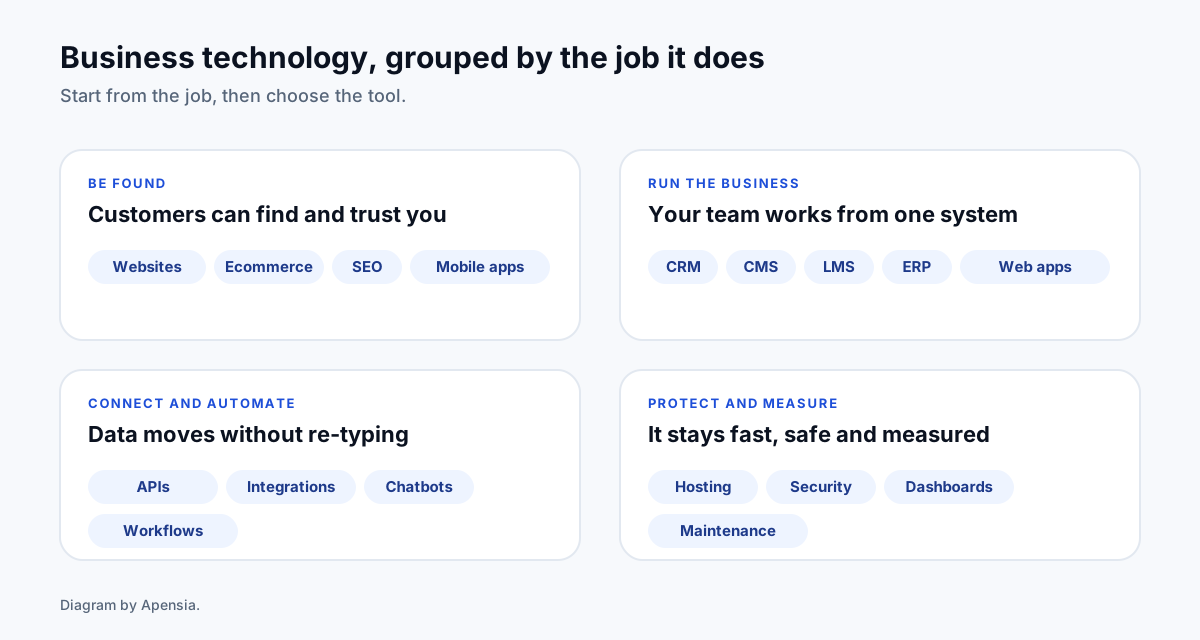
Technology solutions fall into four jobs. Name the job first and the shortlist gets short.
- Be found. Websites, ecommerce, SEO and mobile apps put you in front of customers.
- Run the business. A CRM, ERP, CMS, LMS or custom web application gives your team one place to work.
- Connect and automate. APIs, integrations, chatbots and workflows stop people re-typing the same data.
- Protect and measure. Hosting, security, maintenance and dashboards keep it fast, safe and accountable.
Websites and web design
What it is. The public face of the business: pages that explain what you do and make it easy to contact you.
When you need it. Always, if customers look you up before they call. A site that is slow on a phone, or does not say what to do next, loses people you already paid to attract.
What to ask. Who owns the code and domain, how fast it is on a mid-range phone, and whether search is planned into the structure. See website development, UI and UX design and our cost guide.
Ecommerce and payments
What it is. An online store with catalogue, cart, checkout, payment gateway, shipping and tax handling.
When you need it. When you sell products or bookable services and want orders without a phone call. A payment gateway lets customers pay by UPI and cards, and for overseas customers by international cards where your gateway account supports them.
What to ask. Which platform fits (WooCommerce, Shopify or custom), how orders reach your accounts, and who maintains the store. Read ecommerce development and ecommerce SEO.
Web applications and portals
What it is. Software that runs in the browser with logins: customer portals, partner dashboards, booking systems, quoting tools.
When you need it. When customers or staff need to do something, not just read something, and the process is specific to your business.
What to ask. How it is delivered in stages, what a first usable version looks like, and who owns the source code. See software development.
Mobile apps
What it is. An app on iOS and Android, or a progressive web app that installs from the browser.
When you need it. When people use your service repeatedly, need notifications, or need device features such as the camera or location. If they use it once a year, a good mobile website is usually enough.
What to ask. Whether a progressive web app would do the job for less, and who handles store updates. See mobile app development.
CRM, CMS and LMS
These three are often confused. A CRM manages customers and sales. A CMS manages content such as pages and articles. An LMS manages training: courses, assessments and certificates.
Each can be bought, configured from an existing product, or built around your process. We compare the options, with a brief template, in CMS, LMS or CRM for a corporate: build, buy or configure?
ERP and internal tools
What it is. A system that joins inventory, orders, purchasing, finance and HR so each team sees the same numbers.
When you need it. When the business runs on five spreadsheets that disagree, or month-end takes a week because data has to be collected by hand.
What to ask. Whether you need a full ERP or a smaller internal tool for the one process that hurts. A focused tool is often faster to deliver and easier for staff to adopt.
API and system integration
What it is. A connection that lets one piece of software send data to another automatically, for example from your website to your CRM and accounts.
When you need it. When someone on your team copies information from one screen to another every day. We cover how it works, how it stays secure and when you can skip it in API integration for business.
AI chatbots, assistants and workflow automation
What it is. Chatbots that answer customer questions from your own content, assistants that draft or summarise, and workflows that run reports, reminders and approvals on a schedule.
When you need it. When the same questions or tasks repeat daily and a person adds little to each one. Keep a human hand-off for anything sensitive, and start with one narrow use case.
What to ask. What the assistant is allowed to answer, what happens when it is unsure, and how you review its answers. See AI chatbots and workflow automation.
Dashboards and analytics
What it is. One screen that shows enquiries, sales, spend and results from your real data, instead of a monthly spreadsheet someone builds by hand.
When you need it. When decisions wait for a report, or two people quote different numbers for the same thing.
What to ask. Which three numbers matter most, where each comes from, and who is responsible when a number looks wrong. Fewer, trusted numbers beat a wall of charts.
Cloud hosting and security
What it is. The servers your site or application runs on, with backups, monitoring and protection against common attacks.
When you need it. Always. The basics are HTTPS, regular backups you have tested, software updates, least-privilege accounts, two-factor sign-in for admins and a plan for when something breaks.
What to ask. Where your data is stored, who has access, how often backups run and how long a restore takes. Hosting should be in your name, not the agency’s.
SaaS and product builds
What it is. Turning an idea into a subscription product: accounts, plans, billing, support and a dashboard for you to run it.
When you need it. When you have proven demand for a service that many customers would pay for monthly. Build the smallest useful version first and learn from real users.
What to ask. How subscriptions and failed payments are handled, how plans can change later, and what you need to own. We run Limo CRM as our own subscription product, which taught us where billing edge cases hide.
Maintenance and support
Software is never finished. Plugins need updates, browsers change and people need help. Decide before launch who monitors the system, who fixes problems and how fast. See website maintenance.
How should I choose between these options?
- Write the job in one sentence. “Our sales team loses leads because they live in spreadsheets” points to a CRM. “Customers cannot find us” points to a website and SEO.
- Count the people affected. A tool for three people can be simpler than one for three hundred.
- Check for an existing product first. If a standard tool meets 80 percent of the need, configure it and build only the missing part.
- Plan the data. Decide what must be migrated from old systems and who cleans it.
- Start small and stage the rest. A first release your team uses beats a finished system nobody opens.
- Insist on ownership. You should own the code, the data and the accounts.
If you are unsure, tell us the job and we will say which of these you need, and which you do not. The first review is free, and the prices are published.
Sources
- Google Search Central: Optimizing your website for generative AI features on Google Search (last updated 10 July 2026), for the guidance on structure and original content