An online store is a website plus four systems that must all work: a catalogue, a checkout with a payment gateway, tax and shipping rules, and a way to keep stock and orders in sync. For most Indian businesses, WooCommerce or Shopify covers the need; custom code is justified for unusual pricing, B2B ordering or deep integrations. Product pages need structured data and genuine content to rank, and checkout needs relentless testing, because every extra step costs sales.
What an online store actually needs
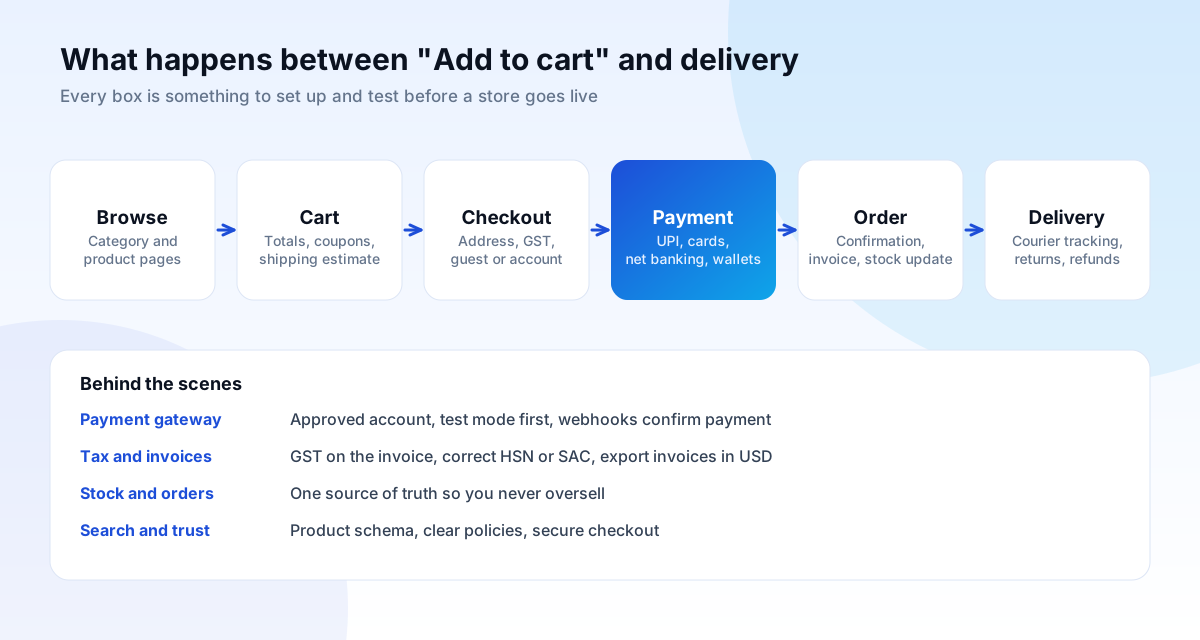
Customers see product pages and a Buy button. Behind that sit several systems, and a store is only as good as its weakest one:
- Catalogue: products, variants (size, colour), images, descriptions, prices, categories and filters.
- Cart and checkout: totals, coupons, shipping choice, guest checkout, address entry and payment.
- Payments: a gateway that accepts the methods your customers use, and confirms payment reliably.
- Tax and invoicing: GST calculated and shown correctly, with a valid tax invoice generated for every order.
- Shipping and returns: rates, courier integration, tracking and a clear returns process.
- Inventory and orders: one source of truth, so you never sell what you do not have.
- Trust and compliance: clear policies, secure checkout, contact details and honest product information.
WooCommerce, Shopify or custom: how to choose
| WooCommerce | Shopify | Custom build | |
|---|---|---|---|
| Hosting | You choose and manage | Included, managed | You choose and manage |
| Ownership | Code and data are yours | Hosted on their platform; you can export data | Fully yours |
| Running cost | Hosting, plugins, gateway fees | Monthly plan, apps, plus gateway or transaction fees | Hosting and maintenance |
| Flexibility | High, through plugins and code | Good within the platform; deep changes are limited | Unlimited |
| Best for | Content-led stores, Indian businesses wanting ownership | Fast launch, small teams, managed checkout | B2B pricing, bundles, complex rules, integrations |
| Watch out for | Slow sites from too many plugins | App costs adding up; limited checkout changes | Higher upfront cost, documentation and handover |
A few rules of thumb we use. If you sell fewer than a few hundred products with ordinary pricing, a standard platform is almost always the right answer. If you want a store running next week with someone else managing servers, Shopify is hard to beat. If you want to own everything and your site is also a publishing business, WooCommerce on well-configured hosting works well. If customers get different prices, order by quote, or need approvals, custom is worth discussing.
Whichever you pick, avoid building on a platform you cannot leave. Ask how you would export products, customers and orders.
Payments: UPI, cards, net banking and international customers
In India, UPI is the default way many customers pay, followed by cards, net banking and wallets. A good checkout offers the methods your customers expect and makes the payment step as short as possible.
Choosing a payment gateway
Gateways such as Razorpay, PayU, Cashfree and others sit between your store and the banks. Compare them on:
- Methods supported: UPI, cards, net banking, wallets, EMI, and international cards if you sell abroad.
- Fees and settlement time: the per-transaction rate and how soon money reaches your bank account.
- Approval and documents: business registration, bank account and website policies are reviewed before you go live; start this early because it can take days.
- Integration quality: a maintained plugin or API, webhooks, refunds from the dashboard, and good documentation.
- International payments: accepting foreign cards or invoicing in another currency typically needs additional enablement by the gateway and compliance with the relevant rules. Ask the gateway what applies to your business before promising customers dollar checkout.
Make payment confirmation reliable
The customer's browser is not a reliable witness. If they close the tab after paying, your store must still learn the payment succeeded. This is what webhooks are for: the gateway tells your server directly, and the order is confirmed from that message, not from the return page. We always test failed, pending and duplicate payments in the gateway's test mode before going live.
Security basics: card details should be entered on the gateway's own secure fields or page, never stored on your server. That keeps most of the compliance burden with the gateway.
GST, invoices and selling across borders
Indian stores must charge the right GST and issue a valid tax invoice. In practice this means:
- The correct HSN or SAC code and GST rate on each product or service.
- Prices shown inclusive or exclusive of GST consistently, and stated clearly at checkout.
- An invoice with your GSTIN, the buyer's details where required, the invoice number, date and tax breakdown (CGST and SGST within a state, IGST between states).
- Records that your accountant can export without re-typing.
For overseas customers, invoices in US dollars or another currency are common. Exports of goods and services can be zero-rated under GST in the right circumstances, with conditions, so confirm the treatment with your chartered accountant rather than guessing. We set up the store so that GST, invoice numbering and currency are configurable, and we will not give tax advice we are not qualified to give.
Shipping, returns and fulfilment
Shipping is where many stores lose margin and customers. Decide before you build:
- Rate model: flat rate, weight-based, zone-based, free above a threshold, or live courier rates.
- Couriers and aggregators: integrations with services such as Shiprocket or the courier's own API give you labels, tracking and cash-on-delivery handling.
- Cash on delivery (COD): it lifts conversions in many categories but also raises return-to-origin losses. Consider a small COD fee, pincode restrictions or a prepaid discount.
- Returns policy: state it plainly on the product page and at checkout. Clear returns increase conversion, and Google's merchant features also read return information.
- Status messages: automatic emails or WhatsApp updates for order placed, shipped and delivered cut "where is my order?" calls significantly.
Ecommerce SEO: product pages, categories and structured data
Stores are among the hardest sites to rank, because thousands of near-identical pages compete with big marketplaces. What works:
Category pages are your main landing pages
People search for "men's running shoes" far more than for one specific model. A category page with a helpful introduction, sensible filters and clear internal links usually earns more traffic than any single product. Write a short, genuinely useful introduction at the top of each category, not a wall of keyword text underneath.
Product pages need original information
Copying the manufacturer's description makes your page one of hundreds. Add what only you know: sizing advice, materials, how it compares, real photos, answers to common questions, and genuine reviews where you have them.
Structured data
Product structured data tells Google the name, image, price, availability and review information on a page, which can make you eligible for richer search results. Use it only for information visible on the page, keep price and availability accurate, and test it in Google's tools. Google's documentation on ecommerce structured data lists the properties and rules.
Technical hygiene for large catalogues
- Avoid duplicate URLs from filters, sorting and tracking parameters: use canonical tags and sensible crawl rules.
- Handle out-of-stock products deliberately: keep the page if the item will return, redirect to the nearest alternative if it will not.
- Keep page speed healthy with optimised images, since product galleries are heavy.
Our SEO services guide explains how the technical, on-page and off-page work fits together.
Conversion: turning visitors into orders
Traffic you have paid for is wasted if the store does not convert. The changes that usually matter most:
- Guest checkout and as few form fields as possible; autofill and address lookup where available.
- Price, delivery cost and delivery date visible early, so there is no surprise at the last step.
- Trust at the point of payment: secure payment badges that mean something, visible contact details, a plain returns policy.
- Fast mobile pages. Most traffic is on phones, and Core Web Vitals problems hit checkout hardest.
- Clear product photography from several angles, and a size or fit guide where relevant.
- Abandoned-cart reminders by email or WhatsApp, sent with consent and kept polite.
Measure the funnel: product views, add to cart, checkout started, payment attempted, order placed. The biggest drop between two steps is where to work first.
Integrations: accounting, ERP, marketplaces and CRM
Re-typing orders into accounting software or updating stock by hand across several channels is where errors creep in. Common integrations include accounting tools such as Tally or Zoho Books, ERP and inventory systems, marketplace listings, shipping platforms and a CRM for customer history. Connecting them through APIs and webhooks saves hours every week. Our API integration guide explains how this works, what it costs in effort, and how to keep it secure.
Pre-launch checklist for a store
- Place real test orders for every payment method, including a failed payment and a refund.
- Check GST, invoice numbering and the invoice PDF with your accountant.
- Test shipping rates for several pincodes and for COD.
- Confirm webhooks update order status even if the customer closes the tab.
- Check emails and WhatsApp messages arrive and are not marked as spam.
- Run a speed test on key pages on a mid-range phone.
- Confirm product schema, canonical tags, sitemap and robots rules.
- Switch on analytics ecommerce tracking and conversion tracking.
- Publish returns, shipping, privacy and terms pages.
- Take a full backup and agree who monitors the store in the first week.
Common ecommerce mistakes
- Launching without testing the payment failure paths. Payments that succeed but orders that never confirm are the costliest bug a store can have.
- Too many plugins. Each adds code, risk and slowness. Prefer a few well-maintained ones.
- Duplicate manufacturer descriptions. They give Google no reason to prefer your page.
- Hidden costs at checkout. Surprise shipping or fees are the top cause of abandoned carts.
- No plan for returns. Returns are a normal part of retail; a clear process builds trust.
- Ignoring mobile checkout. Test every step with a thumb, on a mid-range phone.
- No analytics. Without funnel tracking, you cannot tell where customers leave.
Moving to a new platform without losing traffic
Replatforming is a common moment for traffic to fall, because URLs change and content is lost. Protect what is working:
- Export a list of every current URL with traffic and rankings before touching anything.
- Keep URLs the same where possible; where not, map each old URL to its closest new page with a 301 redirect.
- Carry over titles, descriptions, product copy, images and structured data.
- Launch on a staging site first and compare the crawl of old and new.
- After launch, submit the new sitemap, watch Search Console for errors and keep monitoring for several weeks.
A worked example: where a small store spends its effort
A hypothetical home-décor store with 120 products. Instead of spending evenly, we would put the effort where it compounds:
- Foundations (weeks 1 to 3): store build, payment gateway approval and testing, GST invoice set up, shipping rules for key pincodes, policies.
- Catalogue quality (weeks 3 to 5): original photos and descriptions for the top 20 products that drive most revenue, not all 120 at once.
- Category pages (weeks 4 to 6): five or six category pages written to match searches, with helpful introductions and links.
- Measurement (week 6): ecommerce tracking and a funnel report from day one.
- Growth (month 2 onwards): improve checkout based on the funnel, add search content, start paid campaigns on the products that convert.
Concentrating on the products that matter is how a small store competes with large marketplaces.
Common questions
How much does an online store cost?
Our published starting price for an online store is from ₹1,20,000 (about $1,439), quoted in writing after scoping. The price depends on catalogue size, payment and shipping integrations, and any custom features. See the website cost guide for what moves the number.
Can I start small and grow?
Yes. Launch with a focused catalogue and the payment methods you need, then add features as sales justify them. A good build leaves room to grow without a rebuild.
Do I need my own domain and hosting?
You should own both, in your name. On Shopify the hosting is included; on WooCommerce or custom builds you choose and own the hosting account.
Can I sell internationally?
Yes, but check payment gateway enablement, shipping, customs and tax treatment first. Display prices in the customer's currency where it helps, and be clear about delivery times and duties.
How long does a store take?
A standard store usually takes six to ten weeks including content, payment approval and testing. Custom features add time. Gateway approval and product data are the usual bottlenecks.