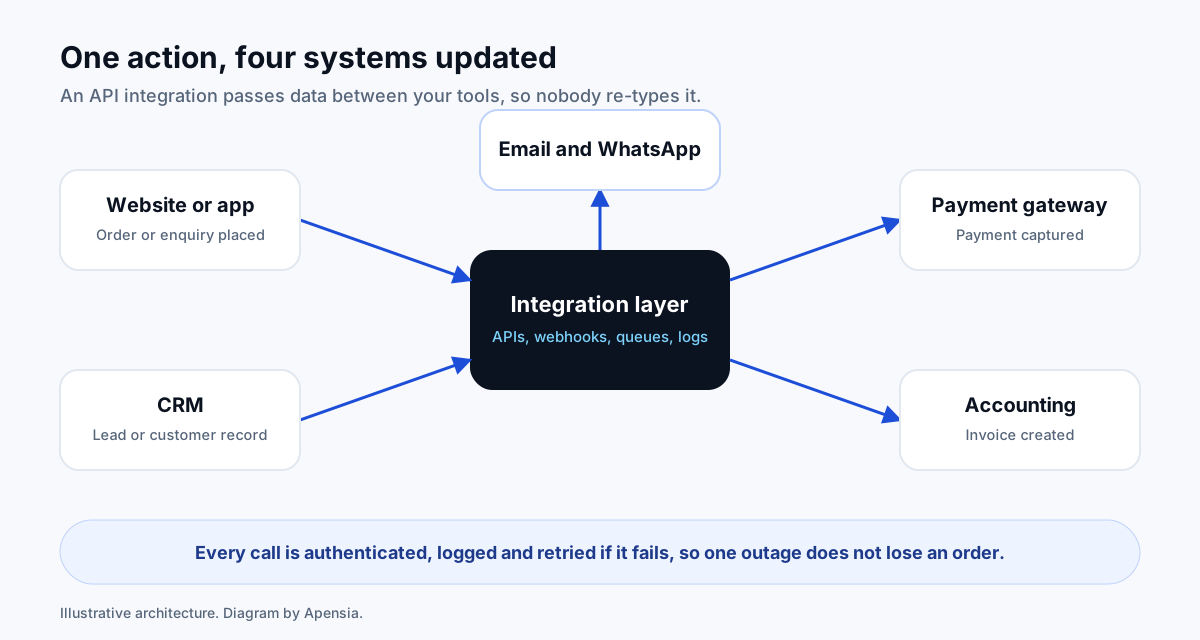
An API integration lets one piece of software send data to another automatically, so nobody re-types it. A typical example: a customer places an order on your website, the payment is captured, a customer record appears in your CRM and an invoice is created, without a person touching any of it. Worth it when staff copy the same data between systems every day. Not worth it for something that happens a few times a month.
What is an API, in plain English?
An API (application programming interface) is a set of rules one program offers so other programs can ask it for data or give it data. Think of a restaurant: the menu is the API, the order is the request, and the kitchen is the system that does the work. You do not need to know how the kitchen runs to order.
An integration is a piece of software that uses those APIs to move data between two or more systems on your behalf.
What do businesses usually connect?
- Website to CRM. Enquiries and form submissions become leads, assigned to the right person with a reminder.
- Website to payment gateway. Customers pay by UPI or card, and your system records the result. Gateways such as Razorpay and Stripe expose APIs for payments, subscriptions and refunds.
- Orders to accounting. Paid orders create invoices so your accountant is not re-keying them.
- Messaging. Confirmations and reminders by email, SMS or WhatsApp.
- Shipping and logistics. Rates, labels and tracking pulled into your store.
- Internal systems. HR, inventory or an older database that a new portal needs to read.
How is an integration built?
The pieces are the same on most projects:
- Requests. Your system calls another system’s API to read or write data.
- Webhooks. The other system calls yours when something happens, such as a payment succeeding, so you do not have to keep asking.
- Authentication. API keys or OAuth prove who is calling. Keys are kept in secure configuration, never in page code.
- Idempotency. If the same message arrives twice, the result is still one order, not two.
- Retries and queues. If the other system is down, the message waits and tries again.
- Logs and alerts. Every call is recorded so a failure can be found and fixed, and someone is told.
Is it secure?
It can be, and the details decide. We apply a short list on every integration:
- Use HTTPS for every call.
- Give each integration the least access it needs, never an admin key.
- Store secrets outside the code and rotate them if they leak.
- Verify that webhooks really come from the sender.
- Do not log card numbers or personal data you do not need.
- Keep payment card data with the gateway so it never touches your server.
What decides how much effort an integration takes?
- The quality of the other system’s API. Well documented and stable is quick. Old, limited or undocumented takes longer.
- How many systems and how many data types. Contacts are easy. Orders with discounts, tax and refunds are not.
- Direction. One-way is simpler than two-way, which must decide what happens when both sides change.
- Volume and timing. Real-time and high volume need more careful design than a nightly sync.
- Error handling. What should happen when something fails is the part people forget to specify.
- Existing data. Messy records need cleaning before they sync.
We scope integrations in writing before building, as part of our software development work.
When do I not need a custom integration?
If a task happens a few times a month, a person doing it is cheaper than software. If both systems already offer a built-in connector for what you need, use it. Automation tools can link common apps without code for simple cases. Custom integration earns its cost when volume is high, the rules are specific, errors are expensive or you need to own and audit the data flow.
What should I prepare before asking for a quote?
- List the systems to connect, with the names of the products and the plan you use.
- Describe the trigger: “when a customer pays” or “every night at 11”.
- List the data to move, and which system is the source of truth for each item.
- Say what should happen when something fails, and who should be told.
- Share the API documentation links, or tell us if there are none.
- Give a realistic volume: orders or records per day.
Send that to us and we will reply with a written scope. See also workflow automation and the technology solutions guide.