AI helps most where work is repetitive, text-heavy and rule-bound: answering common customer questions, routing leads, drafting replies for a person to approve, summarising calls, and moving data between systems. A business chatbot should answer only from your approved content, cite its source, log every conversation and hand over to a human when unsure. Start with one narrow, measurable use, run it for a month, and expand only if it earns its place.
Where AI genuinely helps a business
AI tools are good at language and patterns, and poor at judgement and facts they were not given. That points to a clear set of jobs where they pay off:
- Answering common questions about hours, prices, delivery, policies and how-to, at any hour, in several languages.
- Qualifying and routing leads: asking a few questions, scoring the enquiry and sending it to the right person with a summary.
- Drafting replies, quotes, product descriptions and reports that a person reviews and approves.
- Summarising calls, meetings, long documents and email threads.
- Extracting and entering data from forms, invoices and messages into your systems.
- Internal knowledge search: staff asking "what is our refund policy for X?" and getting the answer with the source document.
And where it does not: anything that needs legal, medical or financial advice with accountability; decisions that must be explainable and audited without a human; and tasks where an occasional confident mistake is costly.
How a business chatbot answers from your own content
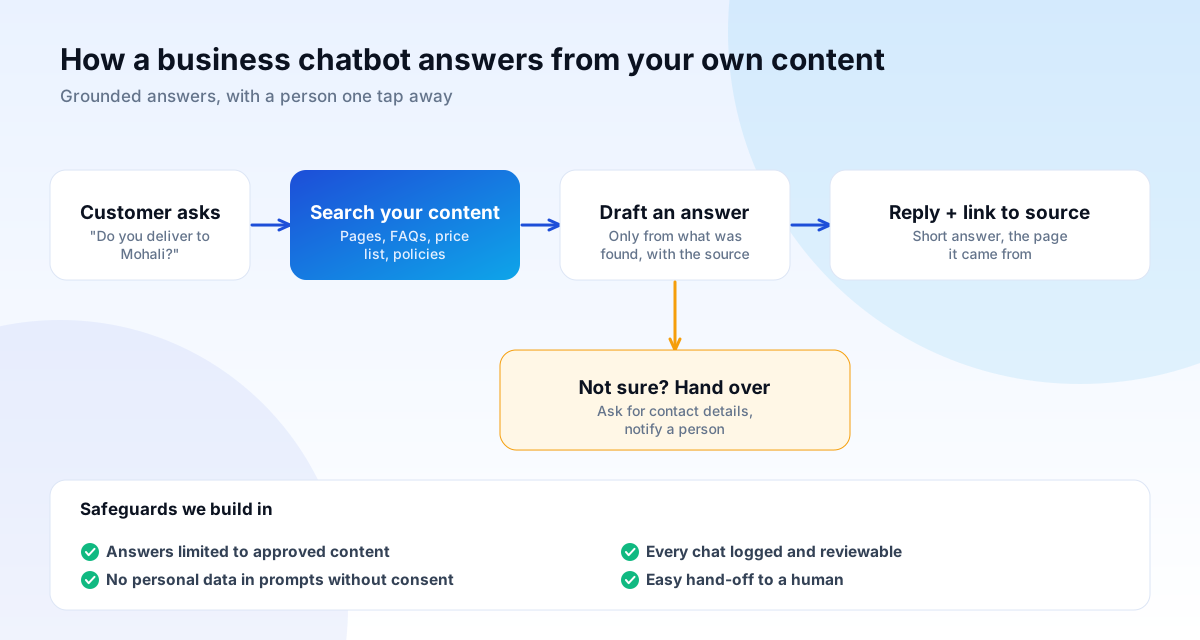
A general AI model knows a lot but nothing about your prices, policies or stock, and can make things up. The reliable pattern for business is retrieval-augmented answering: when a customer asks a question, the system first searches your approved content (web pages, FAQs, price lists, policy documents), then asks the model to write an answer using only what was found, and shows the source link.
This has practical consequences you can check for:
- If the answer is not in your content, the bot should say it does not know and offer a human, not guess.
- Updating the answer means updating the source content, not retraining anything.
- Every answer can point to the page it came from, which builds trust and lets you audit it.
Safeguards to insist on
- Grounding and refusal: answers limited to approved content; "I'm not sure, let me connect you" when the answer is not there.
- Human hand-over: a visible, working route to a person, with the conversation passed along so the customer does not repeat themselves.
- Logging and review: every conversation stored (with appropriate retention) and sampled by your team to find wrong answers and content gaps.
- Privacy: tell users they are talking to an AI, avoid collecting personal data you do not need, check how the provider stores and uses prompts, and comply with applicable law, including India's Digital Personal Data Protection Act, 2023.
- Security: protect against prompt injection (users or documents trying to override instructions), restrict what the bot can do on your systems, and apply the same discipline as any web application. The OWASP Top Ten and its guidance on emerging risks are a good checklist.
- Limits on actions: a bot that can issue refunds or change orders should have caps and confirmation steps.
Workflow automation: examples that save real hours
Automation does not need AI at all. Many of the best wins are simple rules connecting systems:
| Before | After | Typical tools |
|---|---|---|
| Website enquiries copied by hand into a sheet | Form submission creates a CRM lead, assigns an owner and sends a WhatsApp acknowledgement | Webhooks, CRM API |
| Chasing unpaid invoices manually | Reminders sent at set intervals, escalating to a call task | Accounting API, email, WhatsApp Business API |
| Weekly report assembled from five dashboards | One scheduled report, emailed on Monday | Analytics API, spreadsheets, scheduled jobs |
| Order status questions by phone | Automatic updates at each stage | Shipping API, messaging |
| Staff searching shared drives for policies | Internal assistant answering from approved documents, with links | Retrieval over your documents |
Platforms such as Zapier, Make and n8n handle simple flows quickly. Custom code is better for high volume, sensitive data, complex logic, or when you want to avoid per-task pricing and vendor lock-in. Our API integration guide explains how the connections work.
AI-assisted development: what it changes and what it does not
Our developers use AI tools to write boilerplate, generate tests, document code and explore options faster. It speeds up routine work. It does not remove the need for design, architecture, security review or judgement, so every line that ships is reviewed by a person, and we test and secure AI-assisted code like any other. Faster delivery should show up as shorter timelines or more tested features, not as unreviewed output.
AI chatbots, AI search and your website
A chatbot on your site is separate from how AI search systems find you. For appearing in Google's AI Overviews and AI Mode, Google's guidance says optimising is still SEO: no special files or markup, with original, helpful, well-structured content that is indexable and fast. A chatbot is not a substitute for that content; it is another route to it. See our AI search guide.
How to start: one narrow use, one month
- Pick one problem with a measurable cost: "30% of calls are the same five questions".
- Gather the approved content that answers them, and fix gaps and contradictions first.
- Set success measures before building: percentage resolved without a human, customer ratings, hours saved, wrong-answer rate.
- Pilot with a limited audience and review conversations weekly.
- Decide: expand, adjust or stop. Stopping an experiment that does not pay is a good outcome.
What it costs
Costs have three parts: set-up (connecting your content and systems, designing conversations), running costs (model usage, hosting, messaging fees) and ongoing improvement (reviewing logs, updating content). A simple FAQ bot on your site is a small project; automation across your CRM, accounting and messaging is larger. We scope in writing before we build, and quote for AI features within our custom software work.
Questions to ask any AI vendor, including us
- What exactly will the system do, and what will it refuse to do?
- Where does my data go, who can see it, and is it used to train anyone's models?
- How do you stop it inventing answers, and how will I see its mistakes?
- What happens when it is not sure? Show me the human hand-over.
- Who owns the prompts, content and conversation logs?
- What are the running costs per month at my expected volume?
- If I leave, can I take my content, configuration and logs with me?
- How will we measure whether this is worth it after a month?
A worked example (illustrative)
A hypothetical training institute receives 200 enquiries a month, and staff spend hours on the same questions about fees, batch timings and eligibility. A narrow pilot would: gather the approved fee sheet, brochure and FAQ into one source of truth; build a chat assistant answering only from it, with the page it used; capture name and number when a visitor wants a call; push those leads into the CRM with a summary; and hand over to a counsellor on request. Success measures are set in advance: share of questions resolved without staff, time to first reply, and number of leads captured out of hours.
After a month, the team reviews conversations, adds missing answers to the source content and decides whether to extend it to WhatsApp. If the numbers are not there, they stop. The point is a decision based on evidence, not enthusiasm.
Common questions
Will a chatbot replace my team?
It should take over the repetitive questions so your team can handle the ones that need judgement. The good ones keep a human close.
Can it make mistakes?
Yes. Grounding it in your content, logging conversations and giving it a way to say "I don't know" reduces mistakes but does not remove them, so review matters.
Is my customers' data safe?
That depends on how it is built. Minimise what you collect, understand where data goes, use reputable providers with suitable terms, and be transparent with users.
Do I need AI for automation?
No. Rules and integrations solve most problems. Use AI where language understanding genuinely adds value.
Can it work on WhatsApp?
Yes, through the WhatsApp Business platform, which has rules for approved message templates and consent. We design the conversation to fit them.