Before you build an app, check whether a mobile-friendly website or progressive web app would do the job, because it costs less and needs no app store. If you do need an app, most business apps are best built cross-platform (one codebase for iOS and Android), with native reserved for heavy graphics or deep device features. Start with user research and a clickable prototype, release a focused first version, and plan for store review, updates and ongoing maintenance.
Do you actually need an app?
An app is a commitment: two stores, regular updates and a user who has to download and keep it. Many ideas work better as a responsive website or a progressive web app (PWA), which can be added to a phone's home screen, work offline in part and send notifications on supported platforms, with no store listing.
An app is worth it when you need one or more of these: frequent repeat use that justifies an icon on the home screen, deep device features (camera, sensors, Bluetooth, background location), offline-first behaviour, strong performance for complex interactions, or push-based engagement as a core feature.
If the main goal is to be found by new customers, a website with good SEO will outperform an app, because people search the web, not app stores, for most services.
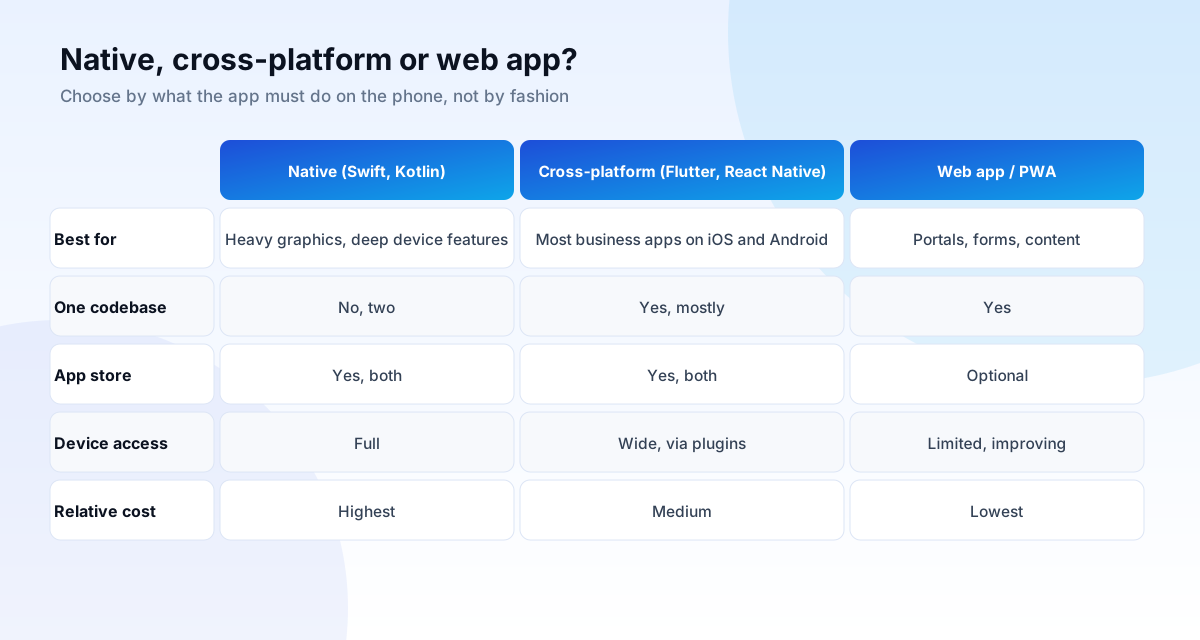
Native, cross-platform or web app?
Native apps are written separately for each platform, in Swift for iOS and Kotlin for Android. They give the best performance and full access to the device, at roughly double the engineering effort.
Cross-platform frameworks such as Flutter and React Native let one team build one codebase that runs on both. For most business apps, such as bookings, catalogues, dashboards, loyalty and field tools, this delivers a very good experience at a lower cost and with faster updates.
Web apps and PWAs run in the browser. They are the cheapest way to reach every device and are ideal for portals and tools, but have more limited access to device features, particularly on iOS.
UX design: how an app earns its place on the home screen
User experience design is the discipline of making a product easy and pleasant for the people who use it. UI is how it looks; UX is how it works. The two are designed together.
The UX process
- Research: who are the users, what are they trying to do, and where does it hurt today? Interviews and watching real use beat assumptions.
- Define: user journeys and the smallest set of features that solve the core problem. Everything else waits.
- Wireframe and prototype: grey screens linked into a clickable flow you can try on a phone.
- Test: put the prototype in front of five or so real users. Even small rounds uncover most of the serious usability problems, as Nielsen Norman Group's research shows.
- Refine and design the interface: typography, colour, components and motion, applied consistently.
- Hand over to developers with specifications, assets and states for every screen, including empty, loading and error states.
Mobile design rules that matter
- Put primary actions in thumb reach and make tap targets large: at least 44 points on iOS and 48 density-independent pixels on Android is the common guidance.
- Keep onboarding short, and ask for permissions (notifications, location) when they are needed, with a reason.
- Design for slow networks and offline: show content that is already loaded and say clearly when something cannot be done.
- Support dynamic text sizes, sufficient contrast (4.5:1 for normal text) and screen readers. WCAG applies to apps too.
- Follow platform conventions: back gestures, navigation patterns and components that users already know.
Scoping the first version
The most common reason an app project fails is trying to build everything first. Define a minimum lovable product: the smallest version that completely solves one important problem for a defined user. Use a simple filter for every feature:
- Will the first users be unable to do the core task without it? If not, it is version two.
- Does it depend on something we do not have yet, such as integrations or content?
- Can it be done manually behind the scenes for now?
Write the scope as screens and user stories, with acceptance criteria. Our process delivers in stages you approve, with a written scope before any quote, so you see working software early.
What the build involves
- Front end: the screens, built in your chosen framework.
- Back end and API: accounts, data, business rules, payments and notifications. This is often more work than the screens.
- Integrations: payment gateways, maps, SMS and WhatsApp, CRM, ERP. See the API integration guide.
- Admin panel: how your team manages users, content and orders.
- Analytics and crash reporting: to see how the app is used and fix problems quickly.
- Security: secure storage, encrypted connections, authentication, and handling personal data lawfully.
App store review: what trips people up
Both stores review apps before release. Common reasons for rejection are avoidable:
- Incomplete or crashing builds and placeholder content.
- Privacy: a missing or inaccurate privacy policy, unexplained permissions, or data collection that does not match the store's declarations.
- Login problems: reviewers need a working demo account.
- Payments: selling digital goods inside an iOS app generally must use Apple's in-app purchase system, with rules that differ for physical goods and services. Read the current guidelines before designing the checkout.
- Thin or copied functionality, where the app is little more than a wrapped website.
Plan for review time in the schedule, since a rejection and resubmission can add days. Both stores also require ongoing compliance, for example keeping up with required platform versions, so budget for yearly updates.
Cost and timeline, honestly
App costs vary enormously with scope, so we scope first and quote in writing, in stages. As a guide to what drives the figure: the number of screens and user roles, back-end complexity, integrations, offline capability, design depth, and whether you need iOS, Android or both. A focused first version commonly takes two to four months from kickoff; complex products take longer and are delivered in phases.
Budget beyond launch, too: hosting, store fees, monitoring, security updates, new OS versions and support are ongoing, and a reasonable planning figure is a yearly percentage of the build cost agreed with your developer. Cost is covered with ranges in our technology guide.
How to avoid an expensive rebuild
- Own the code, the store accounts and the cloud accounts, in your name.
- Insist on documentation and a readable codebase, so another developer can continue.
- Use mainstream, maintained frameworks, not niche or abandoned tools.
- Build the API once and let web, iOS and Android share it.
- Release early to a small group, and let their feedback set the roadmap.
A worked scoping example (illustrative)
A hypothetical salon chain wants "an app". Instead of listing features, we ask what people must be able to do. Interviews with staff and customers show three jobs: book a slot, get a reminder and pay. The first version therefore includes: browse services and stylists, pick a time, pay online, receive a WhatsApp or push reminder, and manage the booking. Everything else waits: loyalty points, referrals, product shop, multi-city support.
That first version may be a PWA or a cross-platform app. The deciding questions are whether customers will return often enough to justify a home-screen icon and whether you need push notifications on iOS. If bookings are occasional, a fast mobile website with WhatsApp reminders delivers most of the value at a fraction of the cost, and the decision is revisited with real usage data.
Security and privacy in apps
- Use encrypted connections everywhere and never store secrets in the app itself, since apps can be inspected.
- Authenticate users properly, with short-lived tokens, and enforce permissions on the server, not only in the screens.
- Store sensitive data on the device only when necessary, using the platform's secure storage.
- Collect the minimum personal data, explain it in plain language, and honour deletion requests. Both stores require accurate privacy disclosures.
- Run security testing before release, including common mobile risks catalogued by OWASP.
After launch: updates, analytics and support
Launch is the beginning. Operating systems release new versions every year, store rules change, libraries need patching and users find edge cases. Plan for crash monitoring, a way for users to report problems, regular releases, and a person who owns the roadmap. Review analytics monthly: where do users drop off in onboarding, which features are used and which are ignored. Cut or fix what is not working, and let real behaviour guide the next release.
Common questions
Can you build both iOS and Android?
Yes. For most business apps we recommend a cross-platform build, which delivers both from one codebase. We will recommend native when the requirements need it.
Can a website be turned into an app?
Sometimes. A PWA may be enough. Stores may reject apps that merely wrap a website with no real native value, so we decide case by case.
Who owns the app?
You do: the source code, store accounts and cloud accounts are in your name.
How do I measure whether the app works?
Track activation (first key action), retention (do people return) and the business outcome (orders, bookings, repeat use). Downloads alone are a weak measure.
Do you also do UI/UX design separately?
Yes. Design can be commissioned on its own, as research, prototypes and a design system, even if another team builds it.