A good website is planned around what a visitor needs to do, designed mobile-first, built on a platform that fits how often your content changes, tested on real phones and handed over with the code, domain and hosting in your name. Search structure, speed and accessibility are decided while it is designed, not added afterwards. A starter site takes roughly two to five weeks, depending on how quickly content and approvals arrive.
What good web design actually means
Design is not decoration. A website exists to help a specific person do a specific thing: book, buy, enquire, find an address, read a policy. Good design removes the effort between that person and that action. Everything else, colour, type, photography, animation, supports it.
In practice, good design rests on five habits:
- Start from the visitor's question. Each page answers one question in the first screen, in the words the visitor would use.
- Design for the phone first. Most visitors in India arrive on a mobile, often on a mid-range device and a patchy connection. If the layout works there, it scales up to a desktop easily; the reverse rarely works.
- One clear next step per screen. A page with six equal buttons has no primary action. We choose one, and make the others visibly secondary.
- Real content, early. Layouts designed with placeholder text break when the real headline is twice as long. We ask for the actual words, prices and photos before the visual design is finished.
- Consistent components. Buttons, cards, forms and spacing come from a small set of reusable pieces, so every new page looks like the same company made it and costs less to build.
Wireframes, then visual design, then a clickable prototype
A wireframe is a grey-box sketch of a page: where the headline, proof, price and button go. Agreeing this first is cheap, because moving a box costs nothing. Visual design then adds colour, type and imagery to the approved structure. For anything with a flow, such as checkout or a booking form, we also build a clickable prototype so you can try it on your own phone before a line of code is written.
Test with people, not opinions. A small round of usability tests, even five people, tends to surface most of the serious problems, according to long-standing research from Nielsen Norman Group. Watching someone fail to find your price page is more persuasive than any debate in a meeting.
Static, dynamic or a web application: which do you need?
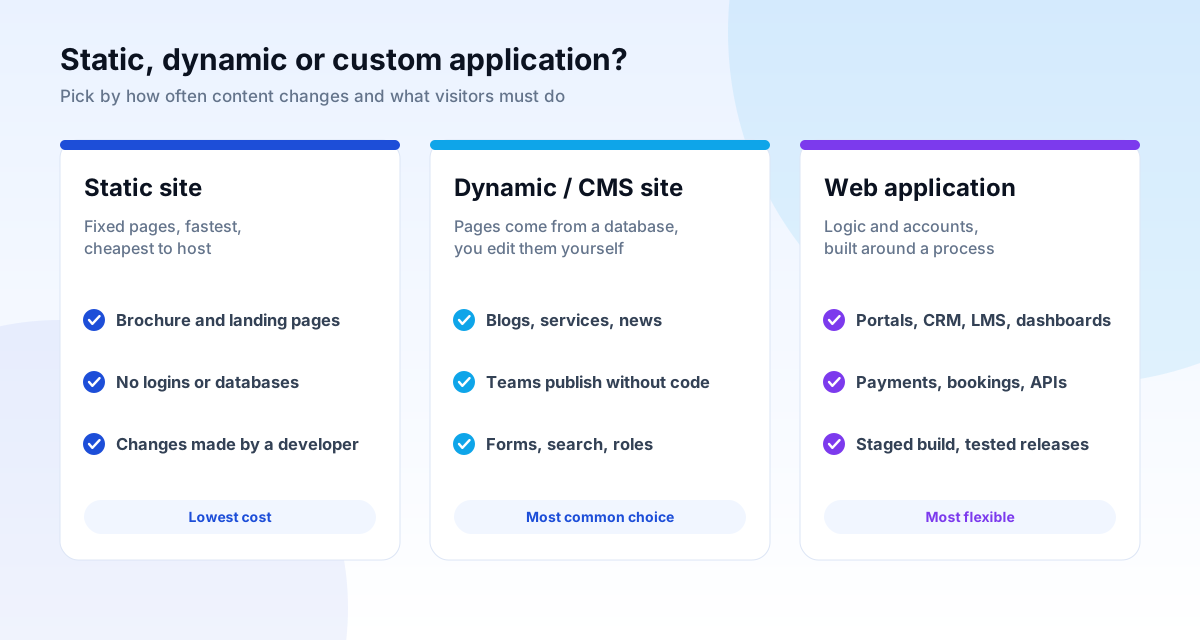
These words are used loosely, so here is what they mean in practice.
A static website is a set of fixed pages. Nothing changes unless a developer edits the files. It is the fastest and cheapest to host and very secure, because there is no database to attack. It suits a brochure site, a campaign landing page or a small business whose text rarely changes.
A dynamic website, usually built on a content management system (CMS), assembles pages from a database. You or your team log in and add a blog post, a service page or a product without touching code. It suits any business that publishes regularly, runs a blog or needs several people to edit.
A web application goes further: it has logins, roles, payments, bookings, dashboards or rules about who can see what. A customer portal, an LMS, a CRM and a booking engine are applications. They are designed around a process, not a page layout, and they are built and released in stages.
WordPress, custom code, Webflow or Shopify: choosing a platform
There is no best platform, only a best fit for the job, the team and the budget. The honest trade-offs:
| Platform | Strong for | Watch out for |
|---|---|---|
| WordPress | Business sites, blogs, publishers; huge plugin ecosystem; easy for non-developers to edit | Slow, insecure builds when too many plugins are stacked; needs updates and backups |
| Custom code (PHP, Laravel, Node, React) | Unusual logic, portals, integrations, high performance, full control | Higher upfront cost; you depend on the developer unless the code is documented and handed over |
| Webflow | Design-led marketing sites with a visual editor | Hosted on their platform; complex logic and large catalogues are harder |
| Shopify | Stores that want a managed, hosted checkout | Monthly fees and app costs; deep customisation is limited |
| WooCommerce | Stores that want ownership and flexibility on WordPress | You manage hosting, security and speed yourself |
Our rule: use a standard platform when it does the job well, because it is cheaper to run and easier to hand over. Write custom code when the business needs something a template cannot do, and say so plainly. We explain the same choice, with more examples, in our platform comparison.
The build process, step by step
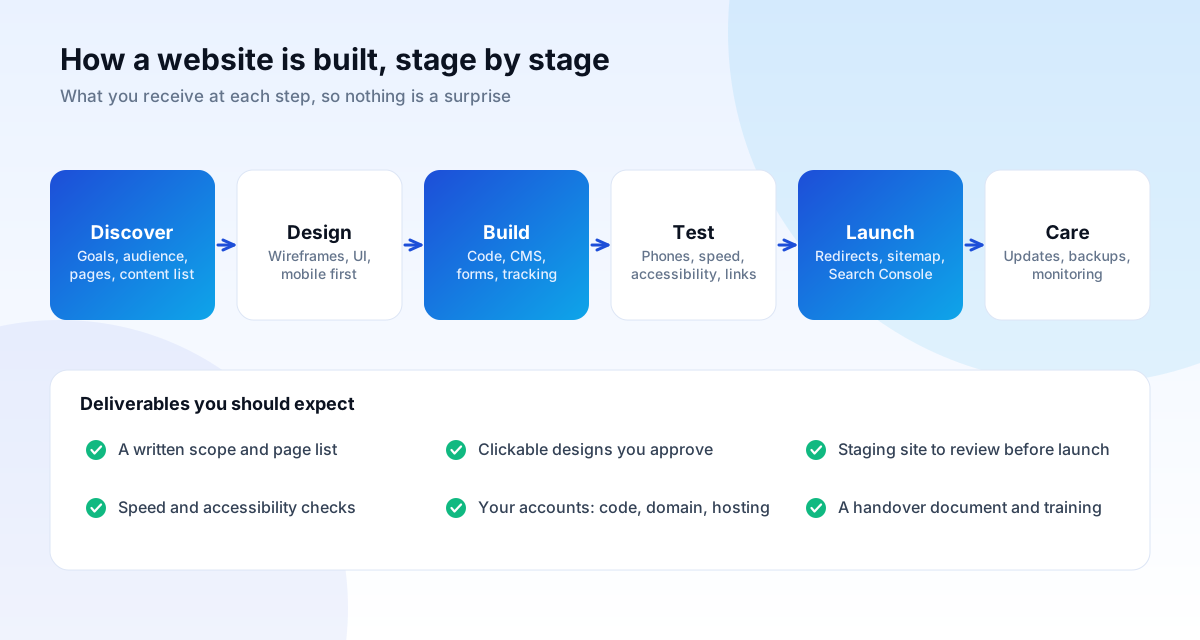
Whatever the platform, a well-run build moves through the same six stages. Knowing them lets you judge any agency's plan.
1. Discovery
We agree the goal (enquiries, sales, bookings), the audience, the pages and the content list. You get a written scope: what is included, what is not, and how long each stage takes. This is also where we look at your existing site's traffic and indexed pages, so a redesign does not throw away rankings you already have.
2. Design
Wireframes, then visual design for the key pages in mobile and desktop widths, then a prototype for any flow that matters. You review and approve in stages, with a set number of revision rounds written into the scope.
3. Build
Developers turn the approved design into code on a private staging site. Forms, tracking, the CMS and integrations are built here. Structured data, titles, headings and internal links are written as the pages are built, not bolted on at the end.
4. Testing
We test on real phones and common browsers, run speed and accessibility checks, test every form and payment in a sandbox, and click every link. Bugs found here are cheap; the same bugs found by customers are not.
5. Launch
Launch is a checklist, not a button: redirects from old URLs to new ones, an XML sitemap submitted in Google Search Console, analytics and conversion tracking confirmed, backups switched on, and a rollback plan in case something is wrong.
6. Care
The first month after launch is when real visitors find what testing missed. We monitor, fix and report, then move to a light maintenance plan if you want one.
Speed: why it decides whether visitors stay
A slow site loses visitors before they read a word, and Google measures it. The three Core Web Vitals, assessed on real-user data, have published thresholds for a "good" experience:
| Metric | What it measures | Good |
|---|---|---|
| LCP, Largest Contentful Paint | How quickly the main content appears | 2.5 seconds or less |
| INP, Interaction to Next Paint | How quickly the page responds to taps and clicks | 200 milliseconds or less |
| CLS, Cumulative Layout Shift | How much the layout jumps while loading | 0.1 or less |
These are measured at the 75th percentile of real visits, so a fast result on your office Wi-Fi proves little. The practical levers are well known:
- Images: serve modern formats (WebP or AVIF), at the size they are displayed, and lazy-load those below the first screen. Give every image a width and height so the layout does not jump.
- JavaScript: ship less of it. Remove unused plugins and third-party scripts, and defer anything not needed to render the page.
- Fonts: use one or two families, subset them, and let text show immediately with a fallback.
- Hosting and caching: decent hosting close to your visitors, page caching, and a CDN for static files.
- Database and code: on dynamic sites, efficient queries and clean templates matter more than another caching plugin.
Speed is also a conversion issue, not only a ranking one: a page that responds instantly feels trustworthy.
SEO foundations built in from day one
Search engines are visitors that cannot see your design. They read your HTML, follow your links and judge your content. Getting the foundations right while building is far cheaper than retrofitting them:
- Crawlable, indexable pages. Important content is in the HTML, not hidden behind a script that fails; pages are not accidentally blocked by robots.txt or a stray noindex tag. Google's documentation on JavaScript SEO explains what can go wrong with heavy client-side rendering.
- One topic per page, with a descriptive title and a single H1. Headings follow a logical outline.
- Clean URLs and redirects. Short, readable addresses, with 301 redirects from every old URL when a site is rebuilt.
- Internal links that connect related pages, using descriptive link text.
- An XML sitemap and canonical tags so Google knows which version of a page to index.
- Structured data (schema) where it genuinely describes the page: Organization, LocalBusiness, Article, Product, Breadcrumb.
- Mobile-friendly layout. Google indexes the mobile version of your site, so the mobile page must contain the same essential content as the desktop one.
Google is explicit that there is no special file or markup needed beyond these basics, for ordinary results or for its AI features. Clear, original, well-structured pages are what count. Our SEO services guide covers what comes after launch.
Accessibility: the part most sites skip
About one in six people worldwide lives with a significant disability, and many more have temporary limits, such as a broken wrist, bright sunlight on a screen, or a noisy room. Accessible sites work for all of them, and they tend to rank and convert better because they are simpler and clearer.
The reference standard is the Web Content Accessibility Guidelines (WCAG). A sensible target for a business site is level AA of WCAG 2.2. The everyday basics:
- Text contrast of at least 4.5:1 for normal text and 3:1 for large text.
- Keyboard access: every link, button and form works without a mouse, with a visible focus outline.
- Text alternatives for meaningful images, and empty alt text for purely decorative ones.
- Labelled forms with clear error messages that say how to fix the problem.
- Tap targets large enough to hit with a thumb. WCAG 2.2 sets a minimum of 24 by 24 CSS pixels; larger is kinder.
- Respect for reduced-motion settings so animation does not make anyone ill.
Automated checkers find a minority of issues, so we combine them with manual keyboard and screen-reader checks.
Security and data protection
Most hacked small-business sites are not targeted individually. They are caught by automated scans for known weaknesses: outdated plugins, weak passwords, exposed admin pages. Defence is mostly discipline:
- HTTPS everywhere, with the certificate renewed automatically.
- Updates applied promptly to the CMS, themes and plugins, and unused ones removed.
- Strong, unique credentials, two-factor authentication for admins, and least-privilege roles so an editor cannot change settings.
- Daily backups, stored off the server, with a tested restore. A backup you have never restored is a hope, not a plan.
- Input validation and safe database queries in custom code, following the OWASP Top Ten, the industry list of the most common web application risks.
- A firewall or rate limiting in front of login pages and forms.
If your site collects personal data, India's Digital Personal Data Protection Act, 2023 applies to how you collect, store and use it. Ask your legal adviser about the current commencement of its provisions, and keep the data you collect to what you actually need.
Content: the part that is always late
The most common reason a website launch slips is not code. It is content: the words, photos, prices and approvals that arrive weeks after the design is ready. Plan for it from the first week.
- List every page, and who owns the words for each.
- Write for the visitor's question, not the company's history. Lead with what you do, for whom, and what to do next.
- Use real photos of your team, premises and work wherever you can; stock images are fine for backgrounds but do not build trust.
- Keep proof close to claims: a named client, a number you can stand behind, a link to a live project.
We can write or edit copy as part of a project, but we will always ask you to check facts, because only you know them.
What happens after launch: maintenance and care
A website is not a printed brochure. Software ages, browsers change, and content goes stale. Ongoing care typically covers:
- Core, theme and plugin updates, tested on a copy before they go live.
- Daily backups and uptime monitoring, with someone responsible for responding.
- Security scans and malware clean-up if something slips through.
- Small content changes and fixes each month.
- A quarterly check of speed, broken links, indexing in Google Search Console and form delivery.
Decide at the start who does this, and write it down. The sites that fail are usually the ones where nobody was assigned.
Who owns the code, domain and hosting?
You should. The domain registration, the hosting account and the source code should all be in your name, with you as the account holder, from day one. This is not a favour. It is the difference between an asset and a dependency.
Warning signs include a domain registered in the agency's name, hosting you cannot log into, a proprietary builder with no export, or a contract that charges to release your files. Ask for the answers in writing before you sign. Our own terms are simple: everything is in your name, and you can take it to any developer at any time.
How to choose a web design and development company
Whoever you choose, ask these questions and compare the answers:
- Can I see live sites you built, and speak to the owners?
- Who will work on my project, and are they employees or subcontractors?
- What exactly does the quote include, and what costs extra?
- Who owns the code, domain and hosting, and can I take it all with me?
- How will you handle redirects and SEO if this replaces an existing site?
- How do you test, on which devices, and what speed score do you aim for?
- What happens after launch, and what does support cost?
Be careful with quotes that are far below the others, promises of guaranteed rankings, and agencies that will not show pricing at all. If you want a published starting point to compare against, ours are on the homepage and in the website cost guide.
Common questions
How long does a website take to build?
A starter site of up to five pages usually takes two to five weeks once content is ready. Larger sites with a CMS take six to ten weeks, and web applications are delivered in stages over several months. Delays are almost always waiting for content or approvals.
Do I need a CMS?
If you will add or change content more than a few times a year, yes. If the site is a fixed brochure, a static build can be cheaper, faster and more secure.
Will a new website hurt my existing Google rankings?
It can, if URLs change without redirects or if content is removed. A proper migration plan keeps what is working: redirect old URLs, preserve ranking pages and check indexing in Search Console after launch.
WordPress or custom code?
Use WordPress when a standard, editable site meets your needs. Choose custom code when you need logic, integrations or performance that a theme cannot give. A good agency will tell you which you need, even when it is the cheaper option.
Can you fix a site someone else built?
Usually, yes. We start with an audit of speed, security, indexing and code quality, and tell you whether to repair or rebuild.