Google Ads (pay-per-click, or PPC) lets you pay to appear when people search for what you sell. It works when three things are right: tight account structure so ads match searches, conversion tracking so you know which clicks became enquiries, and a landing page that makes the next step obvious. Judge a campaign by cost per enquiry and cost per customer, not clicks or impressions. Budget is separate from our management fee, and we never promise a number of leads in advance.
How Google Ads works
When someone searches, Google runs an auction among advertisers whose keywords match. The winner of each ad slot is decided by your bid, the quality of your ad and landing page, and the expected impact of your ad assets. You pay when someone clicks (pay-per-click), not when your ad is shown. That makes PPC measurable and fast: you can be visible on day one, unlike SEO, which takes months.
The trade-off is that visibility stops the day you stop paying, so PPC works best as a complement to SEO. Paid campaigns give quick data on which queries and messages convert, and that learning feeds the organic plan.
Google Ads has several campaign types. For most service businesses, Search campaigns are the foundation, because they catch people who have already typed what they need. Other types, such as Performance Max, Display, YouTube and Demand Gen, serve different goals and need clean tracking before they are worth using.
Account structure: why it decides results
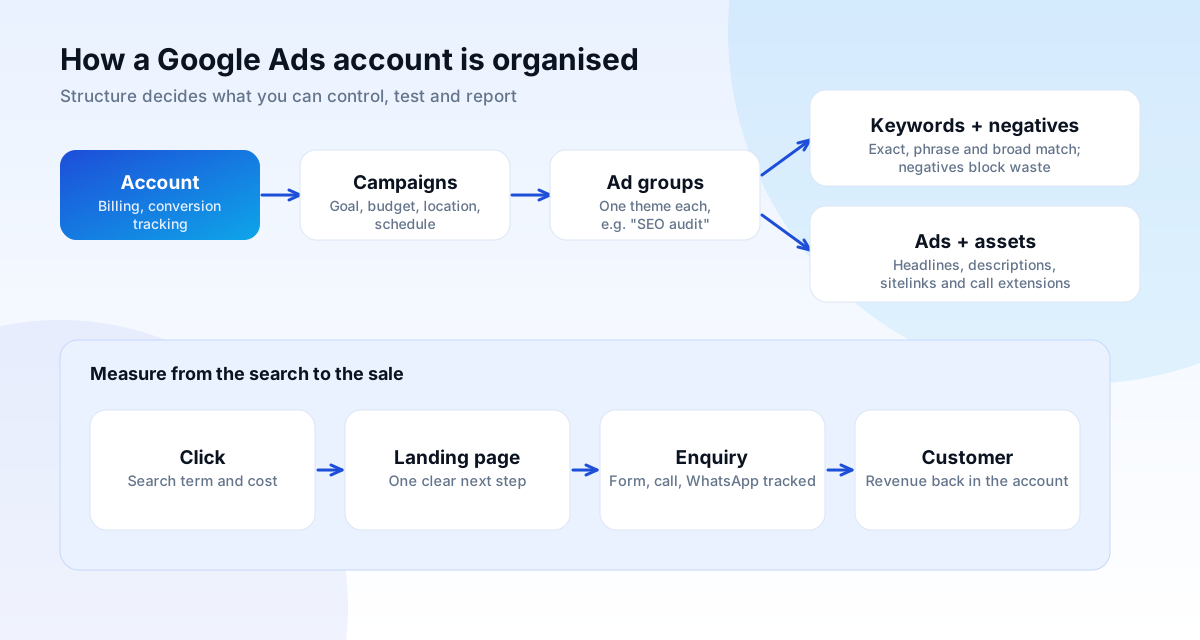
Good accounts are organised so each ad matches the search it answers. The hierarchy is simple:
- Account: billing and conversion tracking.
- Campaigns: one goal each, with its own budget, location, language and schedule (for example, "Web design, Chandigarh").
- Ad groups: one tight theme each, with a small set of related keywords and ads written for that theme.
- Keywords, ads and assets: what you bid on and what searchers see.
A single ad group stuffed with 200 mixed keywords produces generic ads, poor relevance and wasted money. Splitting by theme lets the headline mirror the search, which raises click-through rate and quality, and lowers cost per click.
Keywords, match types and negative keywords
Keywords tell Google which searches your ad may appear for. Match types control how closely a search must relate:
| Match type | Behaviour | Use it for |
|---|---|---|
| Exact | Searches with the same meaning as the keyword | Your highest-intent terms, where you want control |
| Phrase | Searches that include the meaning of the phrase, in context | Balanced reach with relevance |
| Broad | The widest range of related searches | Discovery, only with strong tracking and smart bidding |
Negative keywords are as important as keywords. They stop your ads showing for searches you do not want: "free", "jobs", "course", "DIY", or products you do not sell. Reviewing the search terms report weekly in the first months, and adding negatives, is the most reliable way to cut wasted spend.
Research starts from the customer's words. Group them by intent: people ready to hire ("web design company Chandigarh pricing") convert better than people learning ("what is web design"), and usually cost more per click. Start with the high-intent groups.
Writing ads that get the right clicks
Most Search campaigns use responsive search ads: you supply up to 15 headlines (30 characters each) and up to 4 descriptions (90 characters each), and Google combines them. Good assets:
- Include the searcher's own words in at least a few headlines.
- State a real benefit and a concrete detail: price from, delivery time, location, guarantee that you can honour.
- Give a clear call to action: "Get a free review", "Call today".
- Add assets (formerly extensions): sitelinks to key pages, call buttons, location, price and promotion assets.
- Avoid claims you cannot prove. Google Ads has advertising policies, and misleading claims get ads disapproved.
Ads should attract the clicks you want and discourage the ones you do not. Stating a starting price filters out people who cannot afford you.
Conversion tracking: the non-negotiable
Without conversion tracking, Google Ads cannot tell which clicks led to a result, and neither can you. Before spending, we set up tracking for every action that matters:
- Form submissions and thank-you pages.
- Phone calls from the ad, from the website and by click-to-call on mobile.
- WhatsApp and chat clicks.
- Purchases with the value, for stores.
- Offline outcomes: when an enquiry becomes a customer, imported back into Google Ads so bidding learns what a real lead is worth.
Tracking is implemented through the Google tag and Google Analytics 4, with consent handled according to your privacy policy. We always test the tags before launch and check the numbers against your own records. For a deeper look at tracking a lead from click to customer, see our lead generation section.
Bidding and automation: when to trust the machine
Google offers automated bidding strategies, such as Maximize conversions, Target CPA (cost per acquisition) and Target ROAS (return on ad spend). These use machine learning to bid per auction. They work well when they have enough accurate conversion data, and badly when tracking is wrong or volume is tiny.
Our approach: start with tighter control (manual or limited automation) while data builds, move to Target CPA or Maximize conversions once the campaign records a healthy number of real conversions each month, and keep checking that conversions reflect real enquiries, not junk. Performance Max campaigns, which run across Google's channels, can work for stores with good product feeds, but give less visibility into where spend goes, so they need a clear goal and ongoing checks.
Landing pages: where PPC is won or lost
A strong ad sending people to a weak page is the most common waste we see. A good landing page:
- Matches the ad: the headline repeats the promise that earned the click.
- Has one goal and one primary button, with the navigation reduced.
- Loads fast on mobile, because Google considers landing page experience and visitors leave slow pages.
- Shows proof near the call to action: a client, a number you can stand behind, a review.
- Keeps the form short, and says what happens next ("We reply within one working day").
Test one change at a time, headline, offer or form length, and keep the result in a log.
Budgets and the cost-per-enquiry maths
Two budgets exist in PPC: ad spend (paid to Google) and the management fee (paid to the agency). Ours starts from ₹20,000 a month for digital marketing, with ad spend separate. How much ad spend you need depends on the maths of your business:
- Estimate the value of a customer to you (gross margin, not revenue).
- Estimate how many enquiries turn into customers, for example one in five.
- Work out the most you can pay per enquiry. If a customer is worth ₹20,000 and one in five enquiries buys, the break-even cost per enquiry is ₹4,000.
- Check the average cost per click for your keywords and the landing page conversion rate. Cost per enquiry is roughly cost per click divided by the conversion rate.
If the numbers do not work, change the offer, the page or the targeting before adding budget. We will tell you when PPC is not viable for your margins.
Reporting you should expect
- Spend, clicks and conversions, with cost per enquiry and, once data exists, cost per customer.
- The search terms that produced enquiries, and those added as negatives.
- What changed this month, and what will be tested next.
- Read-only access to your own Google Ads account at all times. It is your account and your data.
A worked example (illustrative numbers)
Imagine a Chandigarh dental clinic that earns about ₹15,000 gross margin from a typical new patient, and converts one in four enquiries into a booked treatment. The most it can pay per enquiry and break even is ₹15,000 divided by four, so ₹3,750 per enquiry. To make a profit, it wants a cost per enquiry well below that, say ₹1,000.
Suppose its keywords cost about ₹40 per click and its landing page turns 8% of visitors into enquiries. Cost per enquiry is roughly ₹40 divided by 0.08, so ₹500. At a ₹30,000 monthly ad budget that is around 60 enquiries, and about 15 new patients. The numbers are made up, but the method is real: work backwards from what a customer is worth, then check whether the click cost and conversion rate can deliver it.
Now see what happens when one number changes. If the landing page converts at 2% instead of 8%, cost per enquiry becomes ₹2,000 and the profit shrinks fast. Fixing the page is then worth more than raising the budget. This is why we audit the landing page before we spend a rupee on clicks.
Checklist: auditing an existing Google Ads account
- Conversion actions are real (enquiries, calls, purchases), not page views or "engaged" clicks counted as conversions.
- The search terms report has been reviewed recently and negatives added.
- Campaigns are split by goal and location, not one campaign for everything.
- Ad groups have tight themes, with ads that echo the keywords.
- Location settings target people in or regularly in your area, not everyone interested in it.
- Ad schedules follow when you can answer calls and messages.
- Budget is not being exhausted by 10am on low-intent terms.
- Automated bidding is backed by enough accurate conversions.
- Brand terms are separated from generic terms, so you can see what really brings new customers.
- Landing pages load quickly on mobile and each has one clear action.
The most common PPC mistakes
- Sending all traffic to the homepage instead of a page built for that search.
- Counting clicks and impressions as success. They are costs, not results.
- Letting broad match run without negatives or tracking. That is how budgets leak into irrelevant searches.
- Changing everything every few days. Smart bidding needs time to learn; frequent edits reset it.
- Ignoring the phone. If calls matter but are not tracked, half the results are invisible.
- Not following up quickly. A lead called after two days is rarely a customer.
- Agency-owned accounts. If the account is in the agency's name, you lose your history when you leave.
Common questions
How much should I spend on Google Ads?
Enough to gather meaningful data within a month or two, and no more than your cost-per-enquiry maths allows. A very small budget in a competitive market will struggle, and we will say so.
How soon will I get leads?
Ads can run within days, and clicks can come immediately. Reliable conversion data and optimisation take several weeks. We do not promise a number of leads.
Is PPC better than SEO?
They do different jobs. PPC is fast and controllable but stops when spend stops. SEO takes months and lasts. Many businesses use paid search for quick demand while SEO builds.
Do I own the Google Ads account?
You should. The account is created in your name with your billing, and we are added as a manager, so you can take it elsewhere at any time.
What about Meta (Facebook and Instagram) ads?
They suit different goals: creating demand rather than catching it. We cover them in the social media and marketing guide.